Overhead IP camera tracker
We have set a simple 2D tracking system in the Robotlab (holodeck).
The system is using one IP camera which is directly connected to the local wired network and we developed a minimal Linux OS tracking software.
The Axis IP camera
About:
www.axis.com/products/cam_m1054/
IP Address:
10.162.242.18
External Link
Basic Installation
- Install OpenCV dependencies:
- Install OpenCV (>=2.3.1, tested with 2.4.1) with various prerequisites mentioned in the official guide
- Download the tracker software: overhead-tracker-1.0.tar.gz
- Software install steps:
   tar -xvf overhead-tracker-MAJOR.MINOR.tar.gz       # unpack
   cd overhead-tracker-MAJOR.MINOR                    # go into the source dir
   make all                                           # compile the package
   make clean                                         # remove the program binaries and object files from the source code directory
Usage
After compiling the source code there are many options:
- Record the camera stream to a file stored on the disk.
./cam_track http://10.162.242.18/mjpg/video.mjpg -r # record MJPEG stream from IP Cam
- Run the tracking algorithm on the camera stream or recording:
./cam_track <stream_address/file> <port>
    ./cam_track http://10.162.242.18/mjpg/video.mjpg 56000	# run the tracking algorithm on MJPEG stream from IP Cam
./cam_track demo/test-demo-recording.avi # run the tracking algorithm on a locally saved file (i.e.: demo recording in the demo directory)- An additional feature is to stream out the data from the tracking algorithm to a remote application connected as a client. Currently, the tracking applications have a stream server embedded which is able to stream data for clients (one at a time). In the current setup, the camera is running at 30 FPS and the stream server outputs a new position from the tracker to a client at 25Hz. The stream server starts at the same time with the tracking.
- The software package also provides a minimal client that can get the data from the tracker and dump it into a file.
   cd remote_access_tester                                  # change directory to the tester
   make                                                     # compile
   ./remote_tester 10.162.242.114 56000 >> remote_data.log  # sample usage with redirecting the received stream into a file
Sample setup
The GUI gives information about the current position of the robot (X and Y coordinates) the markers position in frame coordinates and the heading angle.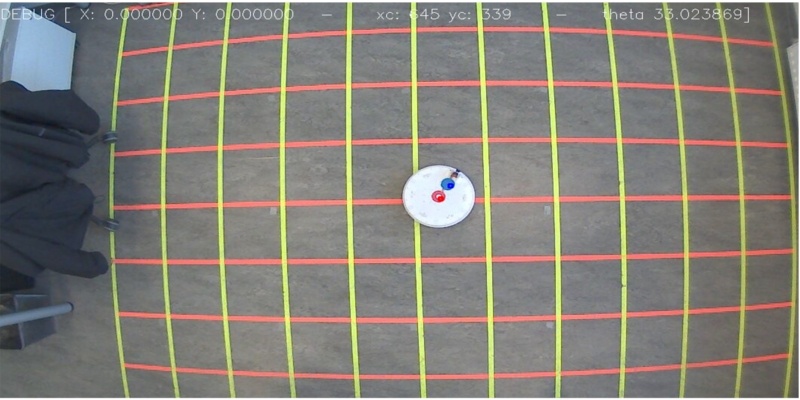
- ensure lights are all on in the room because automatic marker detection is sensitive to illumination; otherwise, manual selection is used by default
- select the 2 markers in the displayed GUI visualizer (markers template download: tracker_markers.tar.gz)
- After selecting the markers (red first and then blue) the coordinate system is aligned in the center of the robot (red marker). The X and Y changes will be reported with respect to this reference frame. The heading is computed between the red and the blue marker as displayed in the diagram and wraps around at 360 degrees.

- the data from the tracking algorithm will be saved in the current directory (source directory)
- data logged data during the algorithm execution will be saved in a text file using a date and time prefixed name e.g “%Y-%m-%d %H:%M:%S” and a fixed identifier *_overhead_tracker_position
   <TIMESTAMP,XPOS,YPOS,HEADING>
         where   XPOS,YPOS,HEADING are the 2D coordinates (reference system fixed in the COG (red marker) of the robot) and heading (between Y axis and second marker (blue))
                 TIMESTAMP number of milliseconds from the start of the app until the current position update
- when only recording the stream the output file will be a MPEG-4 encoded. AVI file at 30FPS using a date and time prefixed name e.g “%Y-%m-%d %H:%M:%S” and a fixed identifier *_cam_tracker_rec.avi